

FOSSBilling supports multiple languages for both the client area and administration workflows. You can use an existing translation, improve one, or add your own.
Installing Languages
Section titled “Installing Languages”FOSSBilling ships with translations that are at least 25% complete. To install more:
- Download the translation files
- Upload to
/locale/in your FOSSBilling directory
Translation Structure
Section titled “Translation Structure”/locale/└── en_US/ └── LC_MESSAGES/ ├── messages.mo ← Compiled translation (required) └── messages.po ← Source file (optional but helpful)Contributing Translations
Section titled “Contributing Translations”Existing Languages
Section titled “Existing Languages”- Go to translate.fossbilling.org
- Create a Crowdin account
- Review and translate strings
New Languages
Section titled “New Languages”Don't see your language?
- Join our Discord
- Ask in
#localizationfor it to be added - We'll add it to Crowdin
- Start translating
Already Have a Translation?
Section titled “Already Have a Translation?”If you've created a complete translation locally:
- Submit a pull request to the locale repository
- Don't include the
.mofile — we generate those automatically - We'll add it to Crowdin for community contributions
For assistance, ask in our Discord.
Setting the Default Language
Section titled “Setting the Default Language”Set the default locale in your config.php file. If you are unsure which key to change, check the configuration reference.
Use a locale code such as en_US, fr_FR, or de_DE.
Managing Languages
Section titled “Managing Languages”FOSSBilling 0.6.0+: Enable/disable languages in the admin panel:
Extensions → Languages
See translation completion percentages and toggle languages on/off.
How Language Selection Works
Section titled “How Language Selection Works”FOSSBilling automatically detects the visitor's preferred language from their browser settings.
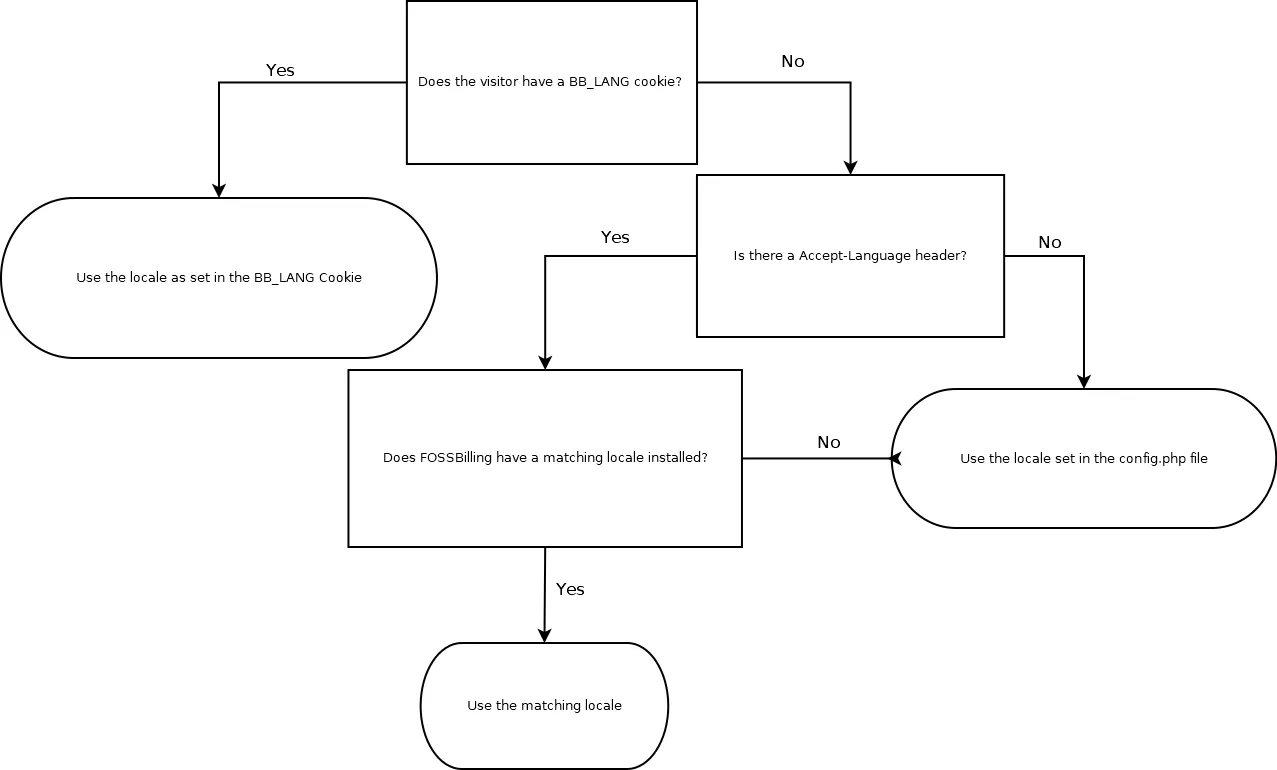
Selection Order
Section titled “Selection Order”- Use browser's primary preferred language (if FOSSBilling has it)
- Fall back to the default locale from
config.php - Manual language selection overrides both
What Counts as a Match?
Section titled “What Counts as a Match?”- Exact match:
en_US↔en_US - Language match:
en_GB↔en_US(same language, different region)